How to Manage Your Membership

We show you how to get exactly what you want from the Corgi Model Club...


As a member of the Corgi Model Club you will receive a monthly delivery of an officially licensed die-cast Corgi Toys re-issue from our collection. Your monthly payment is taken automatically each month on the date you joined.  


STAY IN CONTROL


To ensure you remain in control of your Corgi Model Club membership, you can access your customer portal by logging into your membership account where you can make as many changes to your membership as you like and at any time.

1: Swap

HOW TO CHANGE YOUR NEXT MEMBERSHIP MODEL

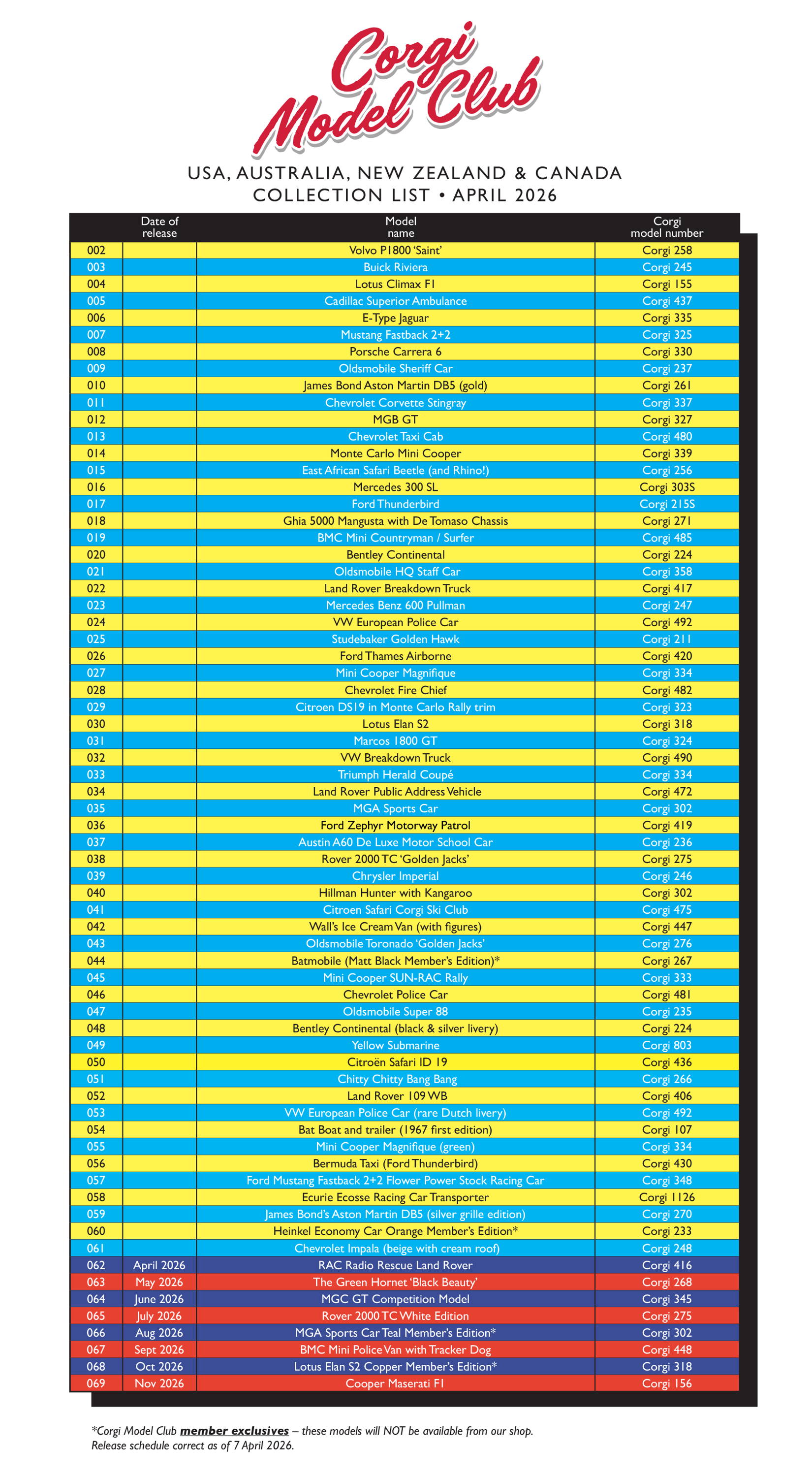
If there’s a model in the Corgi Model Club collection you don’t fancy, simply SWAP it for the next model in the sequence. The default sequence of models is shown below...

2: Catch Up

ADDING EXTRA MODELS TO THE MONTHLY SUBSCRIPTION

We know that new members can find it frustrating when they’re lagging behind in the collection compared to our earliest members. For this reason, we offer a ‘catch up’ service so that all Corgi Model Club members can easily get up to date so they receive the latest models. In your customer portal you can add as many other models as you want to your monthly delivery with extra savings on shipping making catching up an extremely cost effective way to collect our models!

3: Pause/Cancel

PAUSING OR CANCELLING MEMBERSHIP

When you log in to your customer portal you have the option to change the delivery schedule which can be set to a date of your choice up to 6 months, if you want to pause for longer then please contact customer services by email support@corgimodelclub.com and they will do this for you. You can cancel at any time in your customer portal.

Questions and Answers...

How do I swap the next model in my membership?

1. Click on View Your Next Order on the right hand sidebar in your Customer Portal. This will show you the next model you are expecting.
2. Click on the yellow button next to the model that says Manage this Membership
3. On the next page, press the yellow button Swap this for a different model, and choose your preferred model.

PLEASE NOTE - that when you do this, you will be changing your sequence of models. For example, if you select model number 008 (Porsche Carrera 6) as your next shipment, it will be followed a month later by model 009 (Oldsmobile Sheriff Car) unless you change that too.
How do I create a catch-up order?
1. Click on View Your Next Order on the right hand sidebar in your Customer Portal. This will show you the next model(s) to be sent.
2. Scroll down to see the You may also like section.
3. From here you can choose to add the models you'd like to receive as one-off products at membership prices! Add as many or as few as you'd like. 
4. You can identify these products in your next order by the green One-time label. Memberships are differentiated by the green Every month label.

PLEASE NOTE - that when you order separate items you'll need to understand that it is the Membership sequence number that determines what you will receive after your next order. For example, if your next model to be shipped is 006 (Jaguar) and you add one-off purchases of 007 (Mustang), 008 (Porsche) and 017 (Ford Thunderbird), you will still expect to receive the 007 (Mustang) a month later, because that is next in your sequence. Remember then to set up the next order in your membership, taking into account any one-off purchases.

USE THE SEQUENCE OF MODELS ON THE LEFT TO HELP YOU MANAGE YOUR MEMBERSHIP AND ONE-OFF ORDERS
How do I cancel my membership?
Canceling is easy! 

1. Click on View Your Next Order on the right hand sidebar in your Customer Portal. This will show you the next model you are expecting.
2. Click on the yellow button next to the model that says Manage this Membership
3. On the next page, press the yellow button that says Cancel membership

PLEASE NOTE - it would really help us if you could let us know why you want to cancel as you complete the process.

Thank you so much for being a member of Corgi Model Club!